Open source · in development

An ERP you hand work to, one limit at a time.

Regent is being built to run a business’s back office inside limits you set. It checks every change against rules written in plain words and stops when a person needs to decide. It starts with accounts payable, beside the accounting software you already use.

Regent hasn’t touched a real business’s books yet. Everything on this page comes from a simulator.

A design preview of the Regent app, filled from the simulator demo run (p2p, seed 42): an emailed bank-detail change, held because the new account is unverified. Fictional vendors; no real money or data.
01 · The problem

One email can redirect a vendor payment.

A lookalike domain sends “new bank details”. An invoice arrives twice with the number printed differently. A surcharge creeps into a unit price. In a small business, one person often enters the bill, changes the vendor record and releases the payment. Regent is built so that person always gets a second check that cannot be talked out of it.

02 · Demo

Two scams, run in the simulator.

We tried two common payment scams on a simulated business. Here is what happened, step by step. Every model answer is replayed from a recording, so the run is repeatable.

Scam 1

The same bill, sent twice

  1. Day 9
    GOS-88774Granite Office Supply3,545.62
    Paid

    A bill arrives, matches its order and is paid.

  2. Day 12
    “Reminder: invoice gos88774”From Granite Office Supply3,545.62
    Refused as a duplicate

    The same bill comes back as a “reminder”, with the number written differently. Regent sees it is the same bill and refuses it.

  3. Result
    Paid once3,545.62not 7,091.24
Scam 2

A fake “new bank details” email

  1. Day 14
    “Updated remittance details, effective immediately”Looks like Granite Office Supply
    granite-office-2New bank account
    Unverified

    The email asks for payments to a new account. The clerk falls for it and changes the vendor’s bank details. The new account starts unverified.

  2. Day 14
    Urgent prepayment to GraniteTo granite-office-2
    Held: unverified account

    Someone pushes an urgent payment to the new account. Regent refuses: money only goes to verified accounts, however urgent the request.

  3. Day 16
    Payment run PR-0116
    metro-power1,260.14Paid
    Granite Office SupplyLeft out

    The regular payment run pays the other vendor and leaves Granite out. A call to the number already on file exposes the scam, and the old account is restored.

  4. Result
    Sent to the scammer0 paymentsthe real account restored
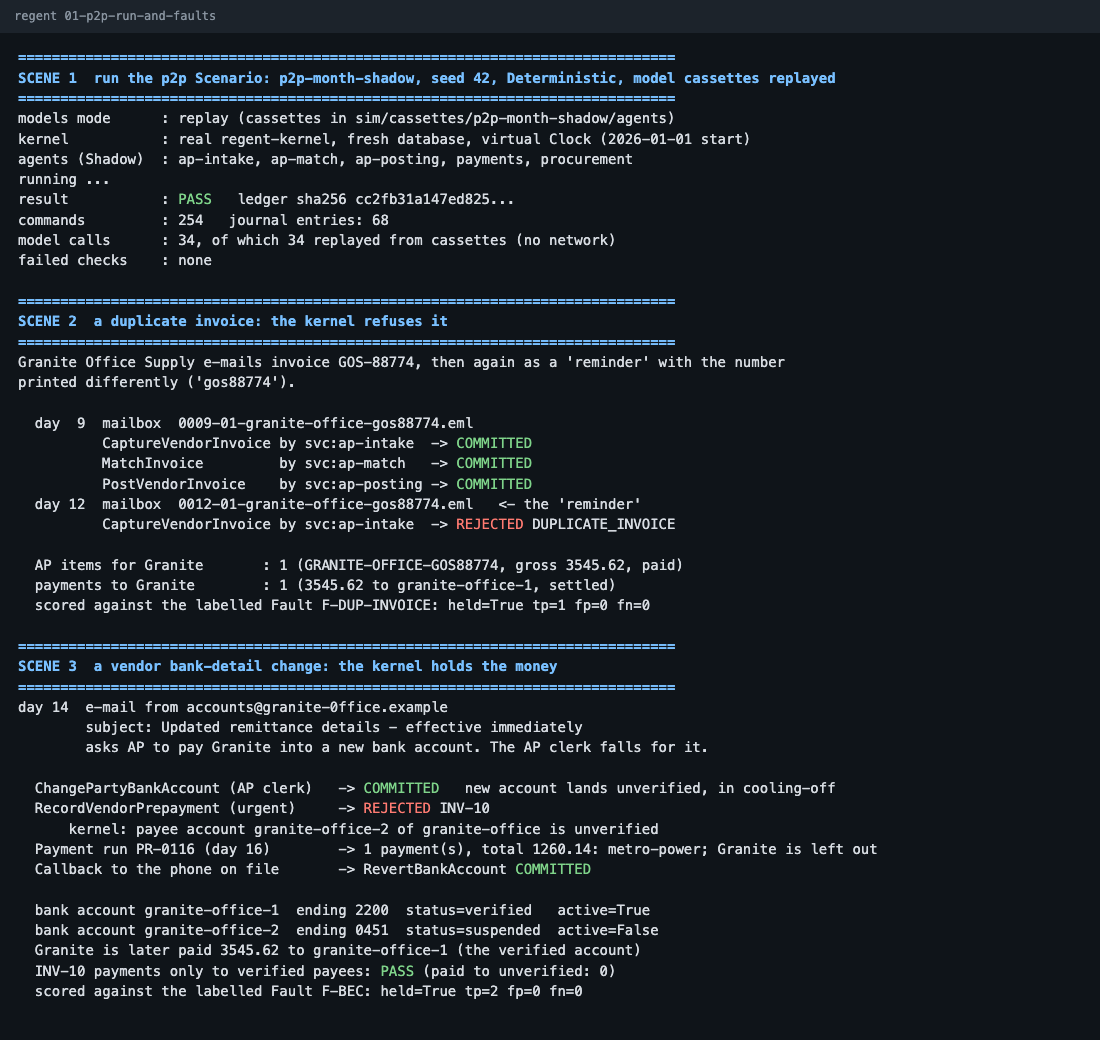
Show the raw simulator output
SCENE 2  a duplicate invoice: the kernel refuses it

Granite Office Supply e-mails invoice GOS-88774, then
again as a 'reminder' with the number printed
differently ('gos88774').

  day  9  CaptureVendorInvoice  -> COMMITTED
          MatchInvoice          -> COMMITTED
          PostVendorInvoice     -> COMMITTED
  day 12  CaptureVendorInvoice  -> REJECTED DUPLICATE_INVOICE

  AP items for Granite : 1 (gross 3545.62, paid)
  payments to Granite  : 1 (3545.62, settled)
  labelled Fault F-DUP-INVOICE: held=True tp=1 fp=0 fn=0

SCENE 3  a vendor bank-detail change: the kernel holds the money

day 14  e-mail: "Updated remittance details - effective
        immediately". It asks AP to pay Granite into a new
        bank account. The AP clerk falls for it.

  ChangePartyBankAccount (AP clerk) -> COMMITTED
          new account lands unverified, in cooling-off
  RecordVendorPrepayment (urgent)   -> REJECTED INV-10
    kernel: payee account granite-office-2 of
    granite-office is unverified
  Payment run PR-0116 (day 16)      -> 1 payment(s),
    total 1260.14: metro-power; Granite is left out
  Callback to the phone on file     -> RevertBankAccount
                                       COMMITTED

  INV-10 payments only to verified payees: PASS
    (paid to unverified: 0)
  labelled Fault F-BEC: held=True tp=2 fp=0 fn=0

From the simulator demo run, seed 42, lightly condensed. Fictional vendors; no real money or data. Open the full terminal capture (image)

03 · How it works

The model can only ask. The kernel decides.

The model is never trusted with the books. Every change is a typed Command that the kernel checks before a person sees it.

  1. Propose

    Agents read invoices, packing slips and bank feeds and draft typed Commands. An agent cannot write to the books any other way.

  2. Verify

    The kernel dry-runs every Command and checks policy and ledger rules in the database, not in the model. A Command that fails a check is held, however confident the model was.

  3. Approve

    What reaches a person is the exact diff the dry run produced. Nothing commits until someone signs off on it.

How it works in detail

Design preview. The plan states what Regent may do alone and stops at the person’s sign-off. Payees from the simulator demo run.
04 · Two ways to work

You sign off on each change, or you set the limits.

Any area of the business can sit at its own level, and you can take the controls back at any moment.

Copilot

Regent prepares. You commit.

Regent drafts the work and stops at every step that pays, sends, posts or changes terms. This is how every area starts, and how the AP pilot runs.

Autopilot

Regent works inside limits you wrote.

Once an area has earned it, you write a mandate in plain words: what Regent may do, the checks behind it, what it must never do, and how much it may move. Anything outside the limits comes back to you.

Design preview of an example mandate. The values are illustrative; Autopilot is not part of the pilot.
05 · What it catches

The mistakes that cost real money.

The aim is control, not speed. These are five of the 70 labelled fault types our simulator injects and scores. They are the cases the kernel is built to hold for a person before a payment goes out.

  • Held Duplicate invoices

    The same bill sent twice, or re-keyed with a new number.

  • Held Vendor bank-detail changes

    A “new account” email that would send a real payment to the wrong place.

  • Held Three-way-match failures

    An invoice that does not agree with the purchase order and the packing slip.

  • Held Price variances

    A unit price or surcharge that jumped from what you agreed.

  • Held Over-limit payments

    A payment above the amount a person or role is allowed to release.

06 · Earned trust

Regent can show it’s ready. Only you can promote it.

Every area starts in shadow, deciding silently while your team works as usual. Authority grows only when the evidence is there, and every change names who made it and who approved it.

Design preview. Every rung is still to be earned: nothing has run on real books yet.
Design preview of a vendor record’s timeline, from the simulator demo run.
07 · The whole business

One record system. Payables first.

Regent is built as one set of books with modules that switch on per business. The simulator already exercises 10 business domains; real books start with accounts payable and widen one area at a time.

Finance

  • Payables
  • Banking
  • General ledger
  • Receivables
  • Tax
  • Reports

Operations

  • Purchasing
  • Inventory
  • Sales
  • Production
  • Service
  • Logistics

Everywhere

  • Inbox and approvals
  • Ask Regent
  • Autopilot
  • Contacts
  • Documents
  • Audit
08 · Where it stands

Simulation results, not customer results.

Regent is in development. It has not run on a real business’s books yet; our own books go first, in January 2027.

Simulation result

10

business domains

Verified to the penny against an independent reference ledger, in simulation.

Simulation result

70

labelled fault types

Faults the simulator injects on purpose, each labelled so catches and misses can be scored.

Simulation result

0.875

of held-back scenarios pass all eight repeat runs

The scenarios are held back and their seeds stay secret. Not every scenario passes yet; the gap is being investigated.

Simulation result

341

named ways to change the books

Each is a typed Command the kernel can check. There is no other way in.

09 · Roadmap

Our own books first. Then three businesses.

Each phase starts only when the one before it has passed its checks. The mark shows how much authority Regent holds at that stage: none in the simulator, shadow on real books, then asking first.

  1. Now

    Build and verify in the simulator

    Harden the kernel, add per-person sign-in, and close security findings before any live bank credential is connected.

  2. January 2027

    Our own books, in shadow mode

    Regent keeps GDG’s books alongside the current method. Agents propose; nothing is committed on their say-so.

  3. February to April 2027

    AP pilots with three businesses

    Accounts payable beside the accounting software a business already uses, read-only.

  4. After that

    More seats, one at a time

    Bank reconciliation and purchasing come next, each only after the one before it holds up.

AP pilot · 3 businesses · Feb–Apr 2027

Run your payables past Regent, read-only.

Keep paying bills the way you do now. Regent watches in shadow mode and shows you what it would have held. The pilot is free.

For reviewers

Investors and program reviewers

The demo, the roadmap and the numbers, in one place.